Run PHP Web Applications on the Java Platform
There has been a lot of commotion and even a book with having Ruby on Rails run on the Java VM. But looking past the JRuby hype it is clear that PHP has a several orders of magnitude more open source code, projects, and corporate backing than Ruby on Rails. The folks behind the Resin application server have the ubiquitous of PHP and have developed Quercus, a PHP 5 implementation written in Java.
Quercus is available with the latest Resin but it is also available for download as a WAR file which can be deployed on Resin or other application Servers such as GlassFish.
Getting Started
Get the latest version of Resin server, as of this writing the latest version is Resin 3.1.3. To start the server just run the <INSTALL DIRECTORY>\bin\httpd script from the command prompt. If you look around the Resin install directory you will find a php folder where the Quercus WAR file is already configured to handle any PHP file. To give the Quercus PHP engine a try, lets create a simple test. First lets create phptest directory in <INSTALL DIRECTORY>\webapps. In the phptest directory create a new file, index.php, and add the following text to it.
[source:php]
<html>
<body>
<?php phpinfo(); ?>
</body>
</html>
[/source]
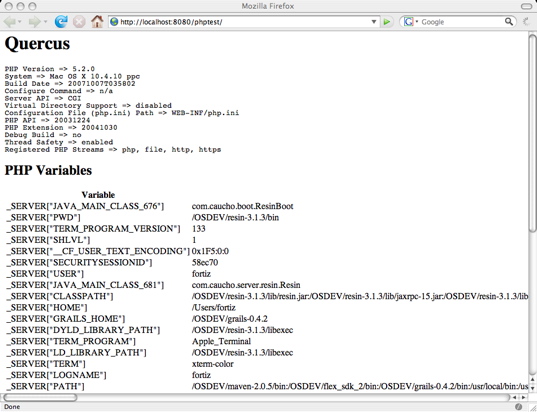
The phpinfo method outputs a large amount of PHP configuration information. I usually print this information out to ensure that PHP is setup correctly. If you have already started the Resin server you can direct your browser to the following URL: http://localhost:8080/phptest/
You should be looking at a screen that looks like the following screen shot.
Mixing PHP with Java
Since Quercus is written in Java there are hooks to import and mix Java classes in your PHP files. Lets import a Java class and manipulate it in PHP. In the next sample piece of code I will import a Java HashMap class and manipulated it PHP. The import functionality is obviously not part of PHP but an extension made possible by Quercus. .
[source:php]
<html>
<body>
<?php
import java.util.HashMap;
$map = new HashMap();
// Add some name-value pairs
$map->put(‘california’, 1000);
$map->put(‘oregon’, 1200);
$total = 0;
// Iterate over keys and sum values
for($itr = $map->keySet()->iterator(); $itr->hasNext(); ) {
$key = $itr->next();
$total += $map->get($key);
}
print “Total $total”;
?>
</body>
</html>
[/source]
Once a Java class has been loaded it can be handled just like any other object in PHP. In addition having access to JDK classes, you can import your own Java code. You can import any class that is available in your web applications class loader.
Run PHP Applications
Using Quercus and Resin you can deploy full fledge PHP web applications such as WordPress or Joomla! To get a PHP application running on Resin with Quercus you just need to unzip the application into the <INSTALL DIRECTORY>\webapps directory. Since your PHP application would be running on top of Java you need to have the right JDBC dirver installed in the <INSTALL DIRECTORY>\lib directory. This is usually all you have to do to have a PHP application to run on JSP/Servlet container like Resin.
There is a list of PHP applications that are known to be running on Java via Quercus.
Quercus opens a lot of opportunities for PHP web development. Now you don’t really have to choose between languages or frameworks, develop in what you know is best for the task and resources at hand and interoperate between PHP, Java, Ruby, Groovy whatever not at the XML level but at the bytecode.
Technorati Tags: php, java, jvm, quercus, jdk, jruby, ruby, rails, rubyonrails, resin